

Your model scores 99% accuracy. Your manager is happy, the notebook looks great, and then the model goes live and misses every single fraud case it was built to catch. This happens more often than people admit, and the confusion matrix is the tool that would have warned you before launch.
This guide explains the confusion matrix in machine learning from zero. You will sort real predictions into the four boxes yourself, calculate every metric by hand with a live calculator, slide a threshold and watch the matrix, ROC curve and precision-recall curve change together, and finish with a 3-class matrix and scikit-learn code. By the end you should not need another tab open.
The short version (read this first)
- A confusion matrix is a table that compares what a classification model predicted with what was actually true.
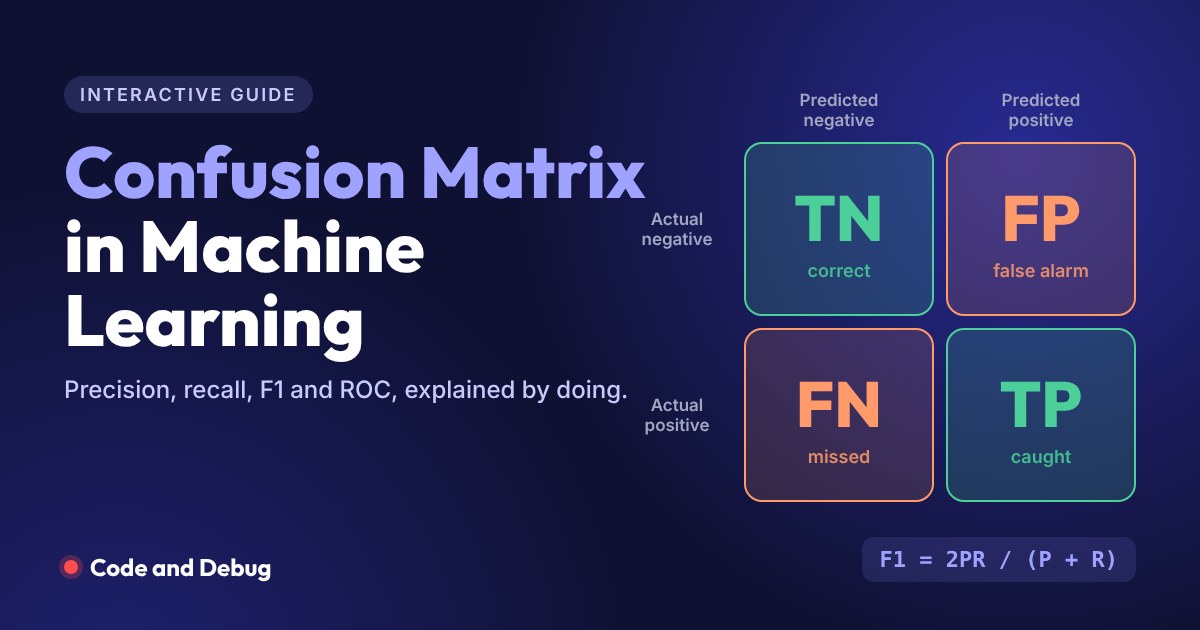
- For a yes/no problem it has 4 boxes: True Positive, False Positive, False Negative and True Negative.
- Every popular classification metric comes from those 4 numbers: accuracy, precision, recall, specificity, F1 score, and the points on the ROC curve.
- Accuracy alone can lie when one class is rare. Precision tells you how trustworthy the positive predictions are; recall tells you how many real positives you caught.
- Which metric matters depends on which mistake costs more: a false alarm (false positive) or a miss (false negative).
Before you start: what you need to know
You do not need advanced maths. If you can divide one number by another, you can follow every formula here. These topics will make the guide easier, and each link opens our own detailed guide:
New to all of this? Read the first 6 sections, play with every widget, and skip the multi-class and Python parts for now. CBSE Class 10 AI students: your syllabus covers the 2×2 matrix, accuracy, precision, recall and F1. Sections 1 to 6 cover all of it.
Here is how the guide is laid out, so you can jump to what you need:
1. Why accuracy is not enough
Accuracy is the share of predictions that were correct. It is the first number everyone looks at, and on balanced data it works fine. The trouble starts when one class is rare.
Take credit card fraud. Imagine 10,000 transactions where only 100 are fraud (1%). A “model” that ignores the data and says not fraud for every transaction is right 9,900 times. That is 99% accuracy, from a model that has never caught a single fraud. This is called the accuracy paradox.
Now compare it with a real model that catches 80% of fraud but wrongly flags 5% of normal transactions. Move the slider to change how rare fraud is:
The accuracy paradox
Lazy model: always predicts “not fraud”. Real model: catches 80% of fraud, flags 5% of normal payments.
- Accuracy
- Recall (fraud caught)
- Fraud caught
- False alarms
- Accuracy
- Recall (fraud caught)
- Fraud caught
- False alarms
Accuracy squashes all the model’s behaviour into one number and hides which mistakes it makes. To see them, we need to split the predictions into groups. That split is the confusion matrix.
2. What is a confusion matrix?
A confusion matrix is a table that summarises how a classification model performed on a test set by counting how many predictions fell into each combination of actual class and predicted class. The name comes from the question it answers: which classes is the model confusing with each other?
For a binary (two-class) problem, one class is called positive and the other negative. “Positive” does not mean good. It simply means the class you are trying to detect: spam, fraud, disease, a customer who will leave. Here is the layout used by scikit-learn and by most textbooks:
correctly cleared
false alarm
missed
correctly caught
Rows = actual class, columns = predicted class. Green cells are correct predictions (the diagonal); orange cells are mistakes.
How to read a confusion matrix
- Read across a row to see what happened to all examples of one actual class. The Actual Positive row tells you how many real positives were caught (TP) and how many were missed (FN).
- Read down a column to see what a prediction really means. The Predicted Positive column tells you, out of everything the model flagged, how many were real (TP) and how many were false alarms (FP).
- The diagonal is good. Everything on the top-left to bottom-right diagonal is a correct prediction. A perfect model has zeros everywhere else.
- Totals check your work. TP + FP + FN + TN always equals the number of test examples.
Watch out: not every source uses the same layout. Some books and websites put Actual Positive in the first row and TP in the top-left. Always read the axis labels before reading the numbers. In scikit-learn, rows are actual and columns are predicted, ordered by label value, so for labels 0 and 1 the TN sits top-left and TP bottom-right.
3. True positive, false positive, false negative, true negative
The four names look confusing until you notice they are built from two words, and each word answers one question:
- The second word (Positive or Negative) is what the model predicted.
- The first word (True or False) says whether that prediction was correct.
So a False Negative means the model said negative and was wrong, which means the case was actually positive. Using a spam filter where positive = spam:
| Outcome | Model said | Reality | Spam filter example | Good or bad? |
|---|---|---|---|---|
| True Positive (TP) | Spam | Spam | Lottery scam goes to the spam folder | Correct |
| True Negative (TN) | Not spam | Not spam | Your Swiggy receipt stays in the inbox | Correct |
| False Positive (FP) | Spam | Not spam | An interview invite is hidden in spam | False alarm |
| False Negative (FN) | Not spam | Spam | A phishing mail lands in your inbox | Miss |
Now try it. Each email below shows what it actually was and what the model decided. Pick the right box, and watch the confusion matrix fill up:
Sort the predictions
Positive = spam. Decide which of the four boxes each prediction belongs in.
Your confusion matrix
4. Type I and Type II errors
Statistics has older names for the two kinds of mistakes, and you will meet them in exams and interviews:
- Type I error = False Positive. You raised an alarm that was not needed. A healthy person is told they might have a disease.
- Type II error = False Negative. You missed something real. A sick person is told they are healthy.
A memory trick: the boy who cried wolf first made a Type I error (the villagers believed there was a wolf when there was none), and later the villagers made a Type II error (they believed there was no wolf when there was one).
The important point is that the two errors almost never cost the same. Missing a cancer is much worse than ordering one extra biopsy. Blocking a genuine payment annoys a customer; letting fraud through loses money. Keep that idea in mind, because the rest of this guide is about measuring and balancing these two costs.
5. Metrics from the confusion matrix (with formulas)
Let us use a small, concrete example. A spam filter is tested on 12 emails. 5 are really spam and 7 are not. The results are: TP = 4, FP = 2, FN = 1, TN = 5. Each metric below answers a different question about these four numbers.
Accuracy
What fraction of all predictions were right? Simple and useful when classes are balanced and both errors cost the same. Misleading on imbalanced data, as you saw earlier.
Precision
Of all the emails the model flagged as spam, how many really were spam? Precision is about trust: when the model says positive, how often is it right? Low precision means many false alarms. It is also called positive predictive value.
Recall (sensitivity, true positive rate)
Of all the real spam emails, how many did the model catch? Recall is about coverage. Low recall means many misses. Doctors call it sensitivity, and on the ROC curve it is called the true positive rate (TPR). All three names mean the same formula.
Specificity (true negative rate)
Of all the genuine emails, how many were correctly left alone? Specificity is recall for the negative class. Medical tests usually report sensitivity and specificity together.
False positive rate
Of all the genuine emails, how many were wrongly flagged? You will need this for the ROC curve.
F1 score
A single score that is high only when both precision and recall are high. It is the harmonic mean of the two, which we explain in the next section.
Now calculate them yourself. Type any four numbers, or load a preset, and every formula is worked out step by step:
Confusion matrix calculator
Change any cell. Each metric shows its formula, your numbers plugged in, and the result.
Try the Imbalanced fraud preset: accuracy is 95.3%, yet precision is only 15.1% because the model raised 45 false alarms to catch 8 frauds. Then try Flags everything: recall is a perfect 100%, but precision drops to 10%. A model can always get perfect recall by calling everything positive, which is why you never report recall alone.
| Metric | Formula | Question it answers | Also called |
|---|---|---|---|
| Accuracy | (TP + TN) / Total | How often is the model right overall? | None |
| Precision | TP / (TP + FP) | When it says positive, how often is it right? | Positive predictive value |
| Recall | TP / (TP + FN) | How many real positives did it find? | Sensitivity, TPR, hit rate |
| Specificity | TN / (TN + FP) | How many real negatives did it clear? | True negative rate |
| FPR | FP / (FP + TN) | How many negatives were false alarms? | Fall-out, 1 − specificity |
| F1 score | 2PR / (P + R) | Is it good at both precision and recall? | F-measure, Dice score |
6. Precision vs recall, and why F1 uses the harmonic mean
In practice you can rarely push precision and recall up together. If you make the spam filter stricter, it flags fewer emails: the ones it does flag are almost surely spam (precision goes up), but more spam slips through (recall goes down). Make it more relaxed and the opposite happens. This is the precision-recall trade-off, and you will control it directly in the next section.
Because of this trade-off, people want one number that rewards a good balance. Why not just average them? Because a simple average can be fooled. A model with precision 1.0 and recall 0.02 (it flags one email, correctly, and misses the rest) has an average of 0.51, which sounds acceptable for a useless filter. The harmonic mean stays close to the smaller number, so F1 for that model is only about 0.04.
F1 score vs simple average
Move precision and recall apart and compare the three scores. Beta controls the F-beta score.
F-beta score
F1 treats precision and recall as equally important. When they are not, use F-beta. With β = 2 (F2), recall counts more, which suits disease screening or fraud. With β = 0.5, precision counts more, which suits spam filters and recommendations. F1 is simply the case β = 1.
7. The threshold, the ROC curve and AUC
Most classifiers do not output yes or no directly. They output a score or probability, like “0.83 chance of spam”, and a threshold (0.5 by default) turns it into a label. We covered this in the logistic regression guide. The key insight: the confusion matrix is not fixed. Change the threshold and you get a different matrix, with different precision and recall.
In the explorer below, each dot is one email placed at the score the model gave it. Orange dots are real spam, green dots are genuine. Everything to the right of the black line is predicted spam. Drag the threshold, then change the model quality:
Threshold, ROC and precision-recall explorer
60 emails: 20 spam, 40 genuine. The red dot on each curve marks your current threshold.
ROC curve
Precision-recall curve
What is the ROC curve?
ROC stands for Receiver Operating Characteristic, a name from radar engineering in World War II. The ROC curve plots the true positive rate (recall) on the y-axis against the false positive rate on the x-axis, with one point for every possible threshold. Each point is one confusion matrix.
- The bottom-left corner (0, 0) is a threshold so high that nothing is flagged.
- The top-right corner (1, 1) is a threshold so low that everything is flagged.
- The top-left corner (0, 1) is the dream: every positive caught, no false alarms.
- The dashed diagonal is a model that guesses at random.
What is AUC?
AUC means Area Under the Curve, usually the area under the ROC curve. It ranges from 0 to 1 and summarises the model across all thresholds in one number. The cleanest way to understand it: AUC is the probability that the model gives a randomly chosen positive a higher score than a randomly chosen negative.
| ROC AUC | What it means |
|---|---|
| 1.0 | Perfect ranking: every positive scores above every negative |
| 0.9 to 1.0 | Excellent |
| 0.8 to 0.9 | Good |
| 0.7 to 0.8 | Fair, often usable |
| 0.5 | No better than random guessing |
| Below 0.5 | Worse than random; the labels may be flipped |
Set model quality to “random” in the explorer and the curve collapses towards the diagonal with AUC near 0.5. Push it to “excellent” and the curve hugs the top-left corner.
When to use the precision-recall curve instead
The ROC curve uses the false positive rate, and on heavily imbalanced data that rate stays tiny even when the model makes many false alarms, because the number of negatives is huge. The ROC curve can therefore look excellent while precision is poor. When positives are rare (fraud, rare diseases, defects), look at the precision-recall curve and its summary, average precision. A random model’s PR curve sits at the positive rate, not at 0.5, so it is a much stricter test.
8. Confusion matrix for multi-class classification (3×3 and beyond)
With more than two classes, the matrix grows to N × N. A support-ticket classifier that routes tickets to Billing, Technical or Account teams gives a 3×3 matrix. Rows are still actual classes, columns are still predicted classes, and the diagonal is still correct predictions.
There is no single “positive” class any more, so you calculate metrics one class at a time, treating that class as positive and all others as negative (this is called one-vs-rest). For the chosen class:
- TP is its diagonal cell.
- FN is the rest of its row: tickets of this class sent to another team.
- FP is the rest of its column: other tickets wrongly sent to this team.
- TN is everything else.
Explore a 3×3 confusion matrix
30 support tickets. Pick a class to treat as positive and see where its TP, FN and FP come from.
Macro, micro and weighted averages
Once you have precision, recall and F1 per class, you combine them into one number in one of three ways:
- Macro average: a simple average across classes. Every class counts equally, so a small class that performs badly drags the score down. Use it when every class matters equally.
- Weighted average: each class is weighted by its support (number of true examples). It reflects overall performance but can hide a weak minority class.
- Micro average: pools all TP, FP and FN across classes and then computes the metric. For single-label multi-class problems, micro F1 equals accuracy.
In the ticket example, the Account class has the lowest recall (0.625). Macro F1 (0.726) is slightly lower than weighted F1 (0.732) because the weaker Account class gets a full one-third of the vote in the macro average.
9. Which metric should you use?
There is no best metric in general, only the best metric for your problem. Ask one question: which mistake hurts more, a false positive or a false negative?
| Situation | Focus on | Why |
|---|---|---|
| Missing a positive is dangerous (disease, fraud, security) | Recall | False negatives are the costly error |
| False alarms are costly (spam filter, legal action, recommendations) | Precision | False positives are the costly error |
| Both errors matter and classes are imbalanced | F1 or PR curve | Balances both; ignores the easy true negatives |
| Balanced classes, equal costs | Accuracy | Simple and honest in this case |
| Comparing models before choosing a threshold | ROC AUC | Threshold-independent ranking quality |
| Several classes, all equally important | Macro F1 | Small classes are not ignored |
Test your judgement on six real scenarios:
Pick the right metric
Six real-world scenarios. Choose the metric you would optimise for each.
10. Confusion matrix in Python with scikit-learn
Everything above takes only a few lines in scikit-learn. Every output below is real, produced by running the code. If you are new to Python, our Python interview questions guide covers the basics used here.
Create a confusion matrix
The same 12 spam emails from section 5. Note that ravel() returns the cells in the order TN, FP, FN, TP for labels 0 and 1.
from sklearn.metrics import confusion_matrix

# 1 = spam, 0 = not spam, for 12 emails
actual    = [1, 0, 1, 1, 0, 0, 1, 0, 0, 1, 0, 0]
predicted = [1, 0, 0, 1, 0, 1, 1, 0, 0, 1, 0, 1]

cm = confusion_matrix(actual, predicted)
print(cm)

tn, fp, fn, tp = cm.ravel()   # sklearn order for binary labels 0 and 1
print(f"TP={tp} FP={fp} FN={fn} TN={tn}")Output:
[[5 2]
 [1 4]]
TP=4  FP=2  FN=1  TN=5
Calculate all the metrics
The classification_report prints precision, recall and F1 for each class, plus macro and weighted averages. Support is the number of true examples of each class.
from sklearn.metrics import (accuracy_score, precision_score,
                             recall_score, f1_score, classification_report)

actual    = [1, 0, 1, 1, 0, 0, 1, 0, 0, 1, 0, 0]
predicted = [1, 0, 0, 1, 0, 1, 1, 0, 0, 1, 0, 1]

print("Accuracy :", round(accuracy_score(actual, predicted), 3))
print("Precision:", round(precision_score(actual, predicted), 3))
print("Recall   :", round(recall_score(actual, predicted), 3))
print("F1 score :", round(f1_score(actual, predicted), 3))
print()
print(classification_report(actual, predicted, target_names=["not spam", "spam"]))Output:
Accuracy : 0.75
Precision: 0.667
Recall   : 0.8
F1 score : 0.727

              precision    recall  f1-score   support

    not spam       0.83      0.71      0.77         7
        spam       0.67      0.80      0.73         5

    accuracy                           0.75        12
   macro avg       0.75      0.76      0.75        12
weighted avg       0.76      0.75      0.75        12
Change the threshold on a real dataset
Here is the trade-off on real medical data: the breast cancer dataset that ships with scikit-learn. We relabel it so that 1 means malignant, the class we must not miss, train a logistic regression, and compare two thresholds.
import numpy as np
from sklearn.datasets import load_breast_cancer
from sklearn.model_selection import train_test_split
from sklearn.pipeline import make_pipeline
from sklearn.preprocessing import StandardScaler
from sklearn.linear_model import LogisticRegression
from sklearn.metrics import confusion_matrix, recall_score, precision_score

X, y = load_breast_cancer(return_X_y=True)
y = 1 - y          # make 1 = malignant (the class we must not miss)
X_train, X_test, y_train, y_test = train_test_split(
    X, y, test_size=0.3, random_state=7, stratify=y)

model = make_pipeline(StandardScaler(), LogisticRegression(max_iter=1000))
model.fit(X_train, y_train)
proba = model.predict_proba(X_test)[:, 1]     # probability of malignant

for threshold in [0.5, 0.2]:
    pred = (proba >= threshold).astype(int)
    tn, fp, fn, tp = confusion_matrix(y_test, pred).ravel()
    print(f"threshold {threshold}: TP={tp} FN={fn} FP={fp} TN={tn} | "
f"recall={recall_score(y_test, pred):.3f} precision={precision_score(y_test, pred):.3f}")Output:
threshold 0.5: TP=61 FN=3 FP=1 TN=106 | recall=0.953 precision=0.984
threshold 0.2: TP=62 FN=2 FP=4 TN=103 | recall=0.969 precision=0.939
Lowering the threshold from 0.5 to 0.2 catches one more malignant tumour (FN drops from 3 to 2) at the cost of three more false alarms (FP rises from 1 to 4). For cancer screening that is usually a trade worth making; for a spam filter it might not be.
ROC AUC and average precision
from sklearn.datasets import load_breast_cancer
from sklearn.model_selection import train_test_split
from sklearn.pipeline import make_pipeline
from sklearn.preprocessing import StandardScaler
from sklearn.linear_model import LogisticRegression
from sklearn.metrics import roc_auc_score, roc_curve, average_precision_score

X, y = load_breast_cancer(return_X_y=True)
y = 1 - y
X_train, X_test, y_train, y_test = train_test_split(
    X, y, test_size=0.3, random_state=7, stratify=y)
model = make_pipeline(StandardScaler(), LogisticRegression(max_iter=1000)).fit(X_train, y_train)
proba = model.predict_proba(X_test)[:, 1]

print("ROC AUC          :", round(roc_auc_score(y_test, proba), 4))
print("Average precision:", round(average_precision_score(y_test, proba), 4))

fpr, tpr, thresholds = roc_curve(y_test, proba)
print("Points on the ROC curve:", len(fpr))
for f, t, th in list(zip(fpr, tpr, thresholds))[1:6]:
print(f" threshold={th:.3f} FPR={f:.3f} TPR={t:.3f}")Output:
ROC AUC          : 0.9968
Average precision: 0.9951
Points on the ROC curve: 10
  threshold=1.000  FPR=0.000  TPR=0.016
  threshold=0.708  FPR=0.000  TPR=0.906
  threshold=0.646  FPR=0.009  TPR=0.906
  threshold=0.473  FPR=0.009  TPR=0.969
  threshold=0.123  FPR=0.075  TPR=0.969
Each row is one threshold and its point on the ROC curve. To draw the curves, use RocCurveDisplay.from_predictions(y_test, proba) and PrecisionRecallDisplay.from_predictions(y_test, proba) from sklearn.metrics. To draw the matrix itself as a heatmap, use ConfusionMatrixDisplay.from_predictions(y_test, pred).
Multi-class confusion matrix
from sklearn.metrics import confusion_matrix, classification_report

# Support tickets classified into 3 teams
labels = ["Billing", "Technical", "Account"]
actual = (["Billing"] * 10) + (["Technical"] * 12) + (["Account"] * 8)
predicted = (["Billing"] * 8 + ["Technical"] * 1 + ["Account"] * 1 +
             ["Billing"] * 2 + ["Technical"] * 9 + ["Account"] * 1 +
             ["Billing"] * 1 + ["Technical"] * 2 + ["Account"] * 5)

print(confusion_matrix(actual, predicted, labels=labels))
print()
print(classification_report(actual, predicted, labels=labels, digits=3))Output:
[[8 1 1]
 [2 9 1]
 [1 2 5]]

              precision    recall  f1-score   support

     Billing      0.727     0.800     0.762        10
   Technical      0.750     0.750     0.750        12
     Account      0.714     0.625     0.667         8

    accuracy                          0.733        30
   macro avg      0.731     0.725     0.726        30
weighted avg      0.733     0.733     0.732        30
These are the same numbers you explored in the 3×3 widget. Pass labels= so the rows and columns come out in the order you expect.
11. Common mistakes to avoid
- Reporting accuracy on imbalanced data. Always check the class balance first and show precision and recall alongside accuracy.
- Mixing up the layout. Check whether rows are actual or predicted before reading any cell. Swapping them swaps precision and recall.
- Forgetting which class is positive. In scikit-learn, binary metrics treat label 1 as positive by default. If your class of interest is 0, set
pos_labelor relabel. - Evaluating on training data. A confusion matrix on data the model has already seen is far too optimistic. Use a held-out test set or cross-validation.
- Tuning the threshold on the test set. Choose the threshold on a validation set, then report the final matrix on the untouched test set.
- Quoting recall without precision (or the reverse). Either one alone can be pushed to 100% by a useless model.
12. Test yourself
Six questions covering the whole guide. Five or more correct and you can explain a confusion matrix in any interview.
Confusion matrix quiz
Takes about two minutes. Keep a calculator handy.
Frequently asked questions
What is a confusion matrix in machine learning?
A confusion matrix is a table that compares a classification model’s predictions with the actual labels. For two classes it has four cells: true positives, false positives, false negatives and true negatives. Metrics such as accuracy, precision, recall and F1 score are calculated from these four numbers.
Why is it called a confusion matrix?
Because it shows which classes the model confuses with each other. Every off-diagonal cell counts examples of one class that the model mistook for another.
What is the difference between a false positive and a false negative?
A false positive is when the model predicts the positive class but the example is actually negative, such as a genuine email marked as spam. A false negative is when the model predicts negative but the example is actually positive, such as a spam email reaching the inbox.
What is the formula for precision and recall?
Precision = TP / (TP + FP) and recall = TP / (TP + FN). Precision measures how many predicted positives were correct, and recall measures how many actual positives were found.
What is a good F1 score?
It depends on the problem and the baseline. As a rough guide, above 0.9 is excellent, 0.8 to 0.9 is good, and 0.5 to 0.8 is moderate. Always compare it against a simple baseline model on the same data.
What is the full form of ROC and AUC?
ROC stands for Receiver Operating Characteristic and AUC stands for Area Under the Curve. ROC AUC is the area under the ROC curve, which plots the true positive rate against the false positive rate at every threshold.
Can a confusion matrix be used for multi-class classification?
Yes. For N classes it becomes an N × N table. Metrics are calculated per class by treating each class as positive and the rest as negative, then combined with a macro, micro or weighted average.
Is accuracy a good metric for imbalanced datasets?
No. When one class is rare, a model that always predicts the majority class gets high accuracy while being useless. Use precision, recall, F1 score or the precision-recall curve instead.
What to learn next
You can now read any confusion matrix, calculate every metric by hand, and choose a threshold for the job. Next, learn cross-validation so your matrix reflects real performance, then models that output better probabilities, such as random forests and gradient boosting. Our AI and ML roadmap shows the full path, and the logistic regression guide is the best place to practise everything you learned here on a real classifier.
